
Citing using Zotero
Zotero is a free tool that makes research way less messy—organise your sources, add notes, and generate citations in a few clicks.
Last updated 27 March 2026

What is Zotero?
Zotero is a free and user-friendly tool for collecting, organizing, annotating, citing, and sharing research.
Getting started
Download and install Zotero
Go to https://www.zotero.org/download/
Download and install Zotero Desktop (Windows, macOS, or Linux).
Install browser connector
On the same download page, install the Zotero Connector for your browser (Chrome, Firefox, or Edge).
This lets you save references directly from web pages.
Create a Zotero account
Sign up for a free account at https://www.zotero.org/user/register
Use this account to sync your library across devices and back up your data.
Set up syncing
Open Zotero Desktop → Select the ‘sync’ icon at the top right of the column of icons.
Enter your Zotero account details and enable syncing.
How to add your reference?
Using the Zotero Browser Connector
Open your source in a library database, Google Scholar, or the library portal.
Search for the article, book, or resource you want.
Click the Zotero Connector icon in your browser toolbar (it may look like a book, page, or folder).
If multiple items appear, select the ones you want in the Zotero Item Selector and click OK.
When prompted, choose the correct folder or collection in Zotero and click Save.
Open Zotero to confirm that the reference has been added with bibliographic details.
Always review imported details for accuracy before using the citation in your assignment.
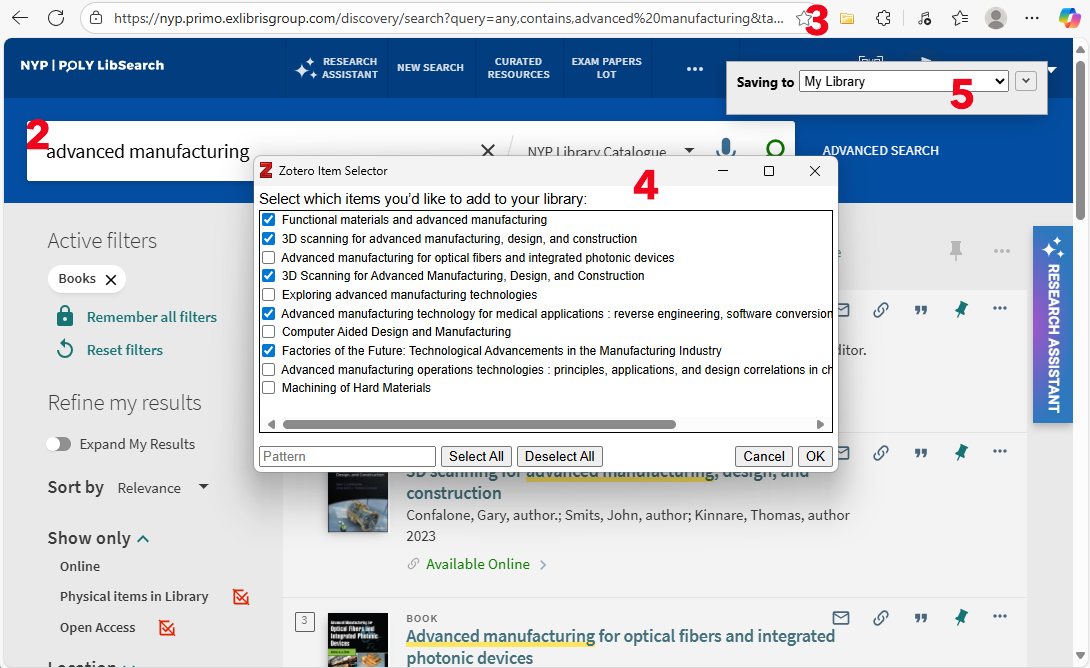
The highlighted numbers correspond to the steps above
Need a more detailed guide on Zotero?
Visit our full Zotero LibGuide for step by step instructions on collecting references from library databases, Google Scholar and other online sources.
Inserting in-text citations and a bibliography
Check Zotero Setup in Word
Make sure you’re signed in to your Zotero account in both the desktop app and the Zotero Connector.
Open a Word document.
Confirm that a Zotero tab appears in the top toolbar — this means Zotero is ready to use.
Insert a Citation in Word
In your Word document, place your cursor where you want the citation.
Go to the Zotero tab in the top toolbar.
Click Add/Edit Citation.
The first time, you’ll be asked to pick a citation style (e.g., APA, MLA, Chicago).
A red search bar will pop up. Type the author, title, or keyword from your Zotero library.
6. Select the reference → press Enter.
The citation will appear in your document.
Insert a Bibliography
Place your cursor where you want the bibliography (usually at the end of your paper).
Go to the Zotero tab.
Click Add/Edit Bibliography.
Zotero will automatically generate a bibliography based on the citations in your paper.
Use AI with Zotero
After building your library in Zotero, you can use generative AI tools to analyze or summarize your sources. Learn how to integrate Zotero with AI to support your research. Always fact check the output and stay in control of your work.
Get help with Zotero
Still have questions about Zotero? We’re happy to walk you through it.